
Back office checklist: 12 points by owner, finance, support, and admin
In this article, the word back office means the system your operator's team uses every day, not the site players see. If you're planning a turnkey betting website, this page helps you check whether the back office you choose has everything your team needs.
Contents
The 12-point checklist below is organized by role: brand owner, finance team, support and marketing, and team admin. Each point says what you can do, where it saves time, and whether that point can be tried in the demo in EVOTEX yet.
Not for: individual players, and anyone looking for legal advice, because this article is written for operators choosing a system for their team's work.
What a back office is, and how to read this checklist
The back office is the screen your team works in. Players don't see it. Players see only the player site. Your team uses the back office to watch money in and out, approve withdrawals, answer players, run promotions, and set permissions for people on the team.
EVOTEX sells the back office together with the player site as one bundle, so this article covers only the back-office side that the team uses. For the player site, read the player site and templates
The EVOTEX demo has 27 pages. A brand's team sees 18 items in the side menu. All of it uses sample data, isn't connected to a live system, and needs no sign-up. This article uses three labels:
- can be tried in the demo: you can really use it in the demo with sample data
- sample: there is a page to look at, but the numbers are sample data and aren't connected to a live system
- designed, not in the demo: it is laid out in a design, but you can't press it in the demo yet
Each point has three lines: what you get, in EVOTEX, and ask the vendor. You can use the last line to ask any vendor, whichever system you choose.
Brand owner: see the whole picture in a few seconds
A brand owner doesn't have to press approve on every item, but needs to know how money looks today and what is pending. The first three points answer that.
Point 1: one page that shows money in, money out, and pending work
What you get: as soon as you open the back office, you know the day's net amount without opening reports one page at a time.
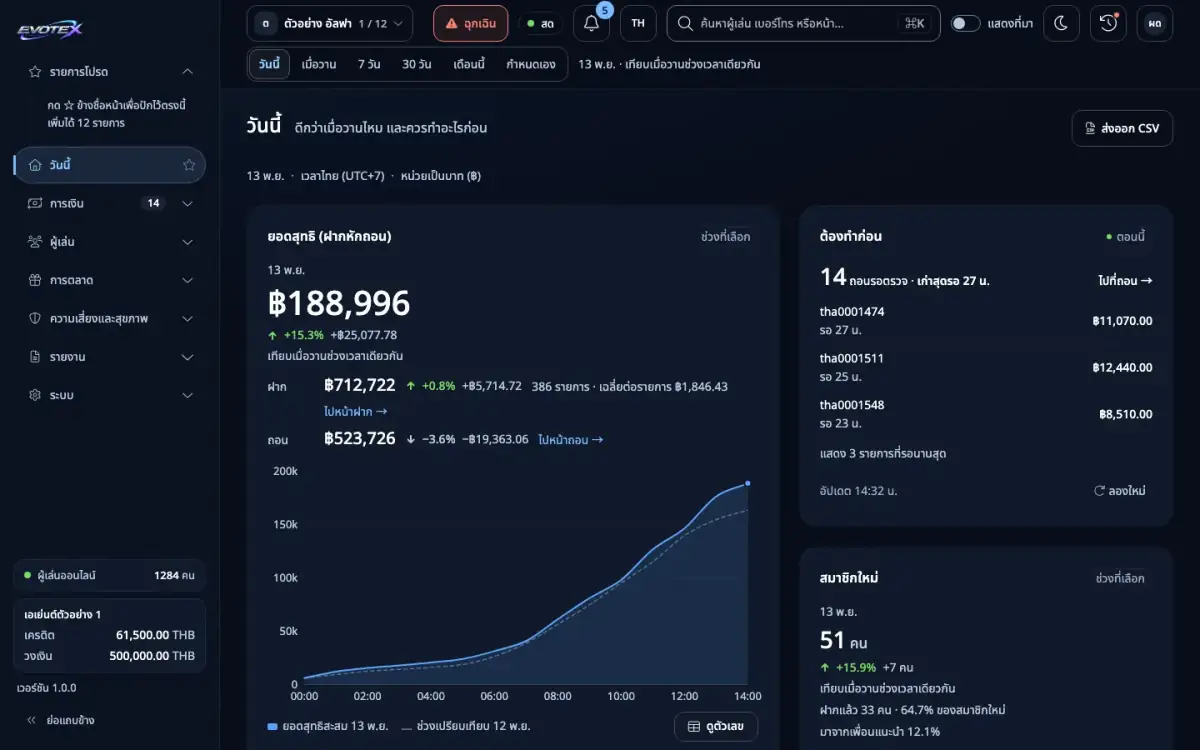
In EVOTEX: the Today page shows the net amount, which is deposits minus withdrawals, compared with the previous period. It has boxes for deposits, withdrawals, new members, and active players. Tap a box to open the items behind it. Under the boxes are the 5 highest pending withdrawals, a chart of deposits and withdrawals, and a button to go approve withdrawals. You can export it as CSV (can be tried in the demo. The boxes for active players and this month's deposit target are labeled as not connected to a live system yet).
Ask the vendor: can you tap through every number box to the items behind it, or are they just numbers that float on the page?
Point 2: several brands in one table
What you get: an owner who runs several brands can compare them without signing in and out.
In EVOTEX: the group home page shows the cumulative net amount for the whole group, and a table by brand with columns for deposits, withdrawals, net, and withdrawals pending right now. You can filter to only the brands that have pending withdrawals or a negative net. Tick two or more brands to compare, then export as CSV. The executive summary page can be viewed for three periods: today, 7 days, and this month (can be tried in the demo. Numbers for brands other than the one you're viewing are estimates, as the banner on the page says). This page is part of the custom terms for several brands. Read more in several brands and domains in one back office
Ask the vendor: does a brand you open later join the table by itself, and can each brand see the other brands' data?
Point 3: reports with a date range and comparison with the previous period
What you get: you can answer an owner's questions fast, such as whether this week was better than last week.
In EVOTEX: the Reports page has 20 report types in 4 groups: finance 8, players 7, promotions 3, and partners 2. You can choose from 7 ready-made date ranges or set your own, compare with the previous period of the same length, view as a chart or a table, and export to CSV (sample. The numbers in the demo are sample data that agree on every page). The list of all 20 report types is in reports a brand owner should open every day (page in Thai)
Ask the vendor: does each report come from the brand's real data since opening day, and what file format can you export to?
Finance team: close money work fast and trace it back
The finance team uses the back office on every shift. If money work is slow, players wait and support gets asked. These three points are where work gets noticeably faster or slower.
Point 4: a withdrawal queue where you select several items and approve in a run
What you get: clear the queue in a batch instead of opening items one at a time.
In EVOTEX: the Withdrawals page puts waiting items on one page, split by status: ready, awaiting review, and claimed. Click a summary box to filter, switch between a table and cards, and select everything that is ready and approve. The system sends the orders one by one and shows the result in each row. Open a row to see the details and reject (can be tried in the demo). The step-by-step details are in how the withdrawal queue works
Ask the vendor: if two people open the same item, how does the system stop the work being done twice?
Point 5: a deposit list that separates automatic from manual top-up
What you get: you see right away which items the system handled itself and which need a person.
In EVOTEX: the Deposits page filters by automatic or manual top-up, and sorts by items to review first, newest, or highest amount. You can review and approve items that are waiting, cancel, or cancel in a batch when they are for the same receiving account. A manual top-up has two steps, requires a reason, and the system warns you if the same player is topped up with the same amount again within 30 minutes (can be tried in the demo). Read more about how money flows in how automatic deposits and withdrawals work
Ask the vendor: which kinds of deposit channels can the system really pick up by itself, and which need a person to review?
Point 6: manage payment accounts and the rotation plan from one place
What you get: you can change the accounts shown to players yourself, without waiting for the technical team.
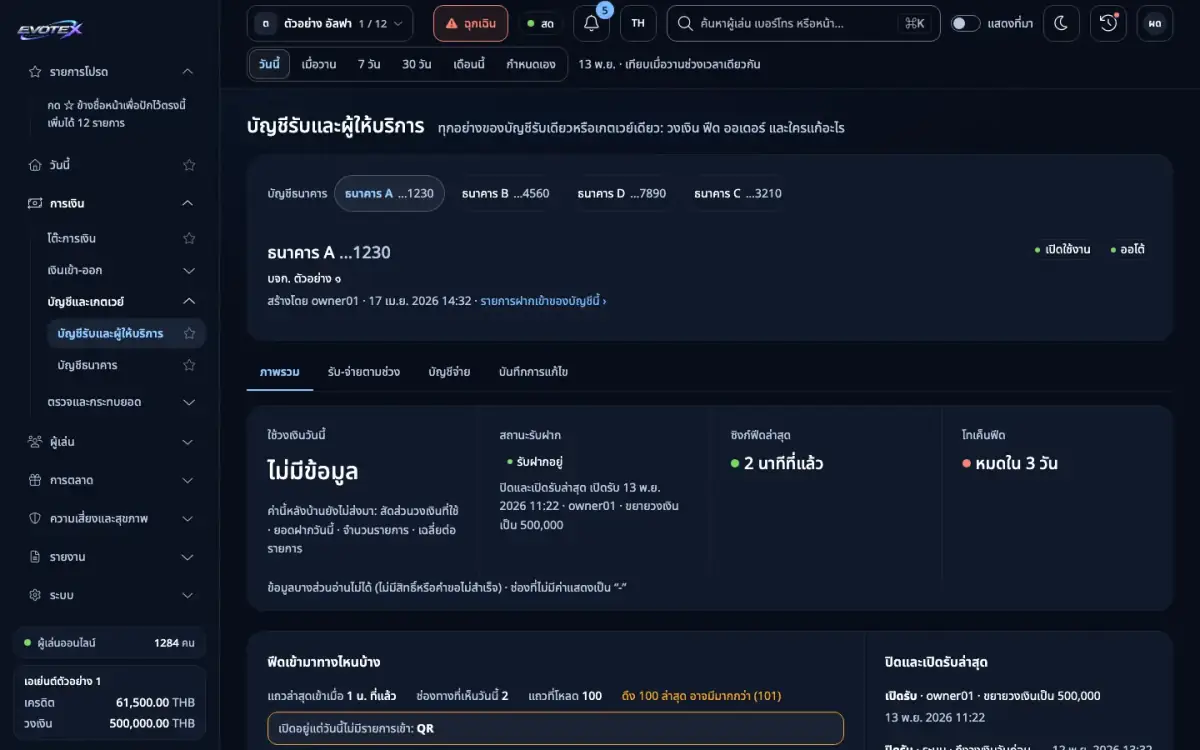
In EVOTEX: the Payments page has 6 tabs: receiving accounts, payout accounts, QR codes, rotation plans, account shifts, and transfers awaiting approval. You can turn display on the site on or off per account, flag an account as automatic, and set a rotation plan by time or by amount (can be tried in the demo).
Ask the vendor: does the account rotation plan run by itself, or does someone have to press change every round?
Support and marketing: answer players and run promotions on your own
These two roles talk to players every day. If they have to ask the technical team to do things every time, work is slow. These three points let the front-line team do it themselves.
Point 7: search players and see a profile from one page
What you get: you can answer a player who gets in touch fast, because you find their data right away.
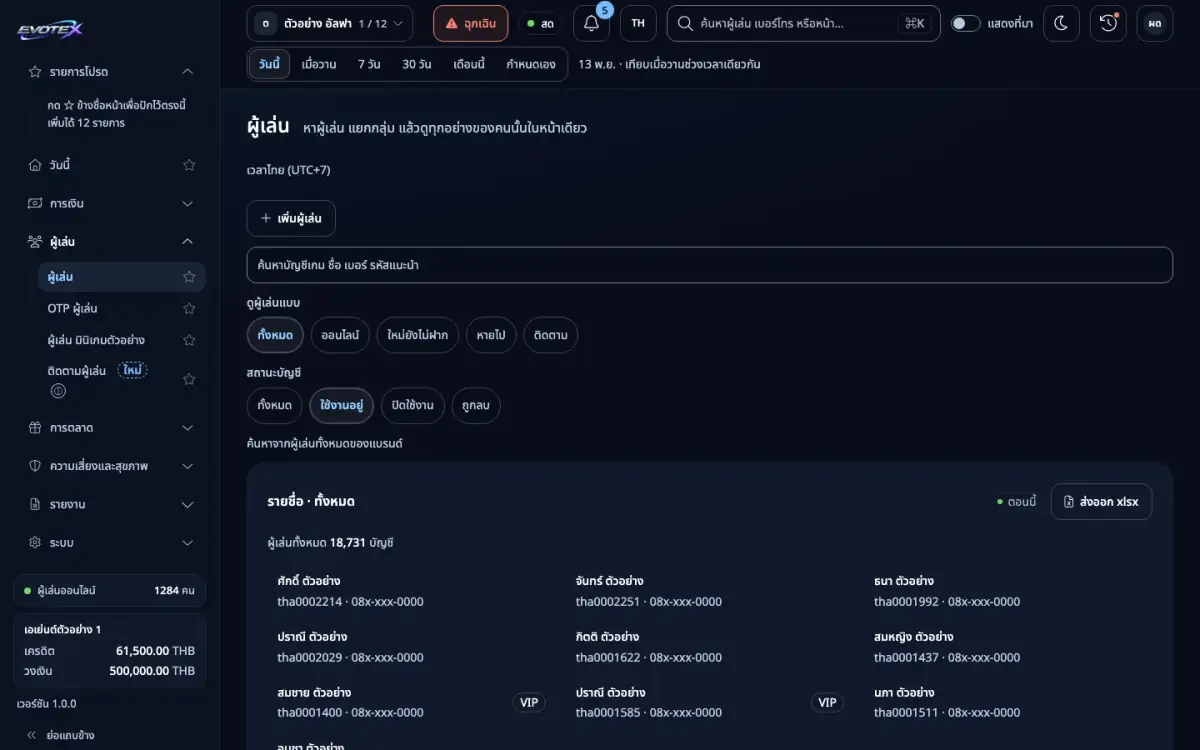
In EVOTEX: the Players page searches by name, username, or phone number, switches between all players, online now, or at risk of wrong sign-ins, filters by status, lets you show or hide columns, and saves filters to reuse. It has a blacklist check that answers only hit or no hit. Phone numbers and accounts are partly masked, and you need permission to see the full number. A player profile has 7 tabs (can be tried in the demo. The risk figures and totals are sample).
Ask the vendor: can support see a player's full number without asking for permission each time, and is there a record of who opened it?
Point 8: LINE chat and auto-reply rules
What you get: repeat questions get answered by themselves, and the team handles what needs a real person.
In EVOTEX: the Chat page has 6 tabs. It has a single button to reply to the person who has waited longest, plus claiming a case, tagging, and quick messages. An auto-reply rule can match 1 to 50 words and reply with 1 to 5 messages. You can order the rules, and there is a box where you type a message to see which rule would answer. You can set up several LINE OA accounts (can be tried in the demo). The chat channel in the demo is LINE only. The AI assistant settings have a field for the starting instructions, but the part where you test asking the AI is simulated.
Ask the vendor: can chat on channels other than LINE be used, and how does the AI that answers in place of a person work?
Point 9: promotions and messages to players that the team sets up itself
What you get: the marketing team turns promotions on and off right away, without waiting for a system change cycle.
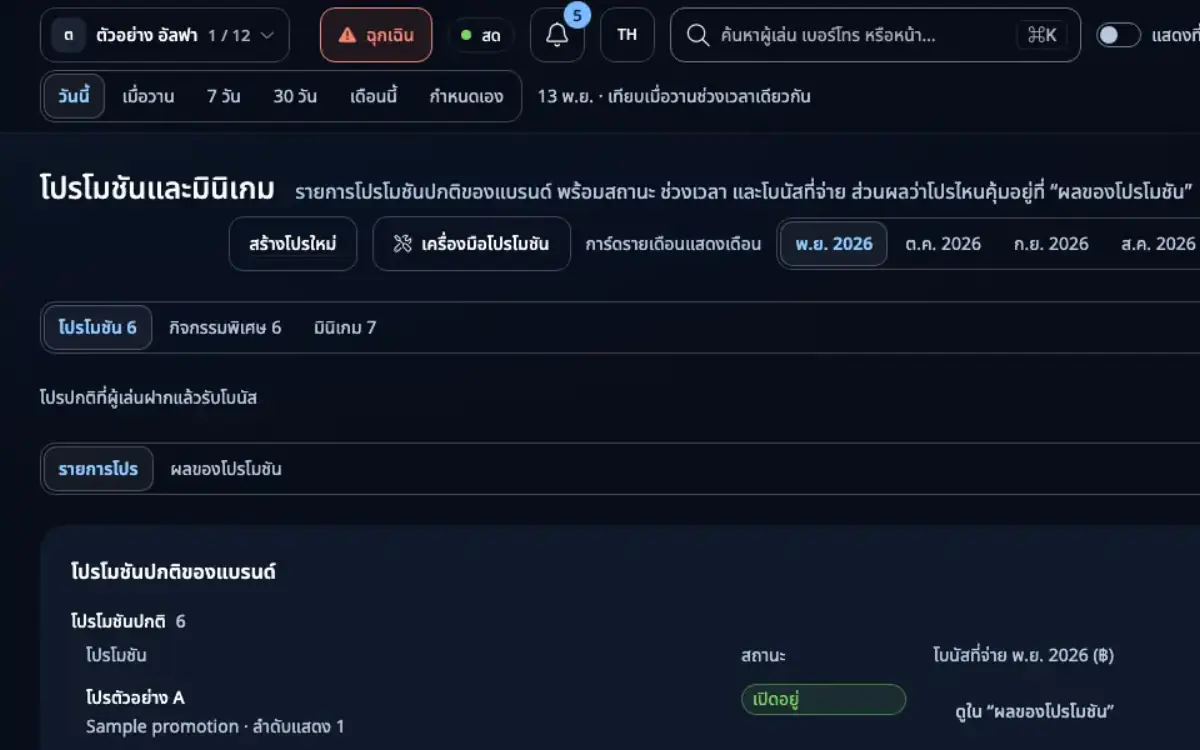
In EVOTEX: the Promotions page has an on and off switch at the end of each row, and a banner warns when promotions overlap. You set up a promotion with a 6-step sheet. The Messages page sends alerts to web devices, Android, and iOS, sends SMS, schedules in advance, and sends into Telegram (can be tried in the demo. The recipient groups, message templates, and open results are sample). The details are in promotions in the back office and players and communication in the back office
Ask the vendor: after you set up promotions, can you see the result of each one separately, and do overlapping promotion rules warn you before saving or after?
Team admin: set permissions, look back, and control the player site
The last role is the person who makes sure everyone can work within their own scope, and adjusts the player site to match the brand.
Point 10: set team permissions in fine detail by role
What you get: you can add a new person fast, giving only what they need.
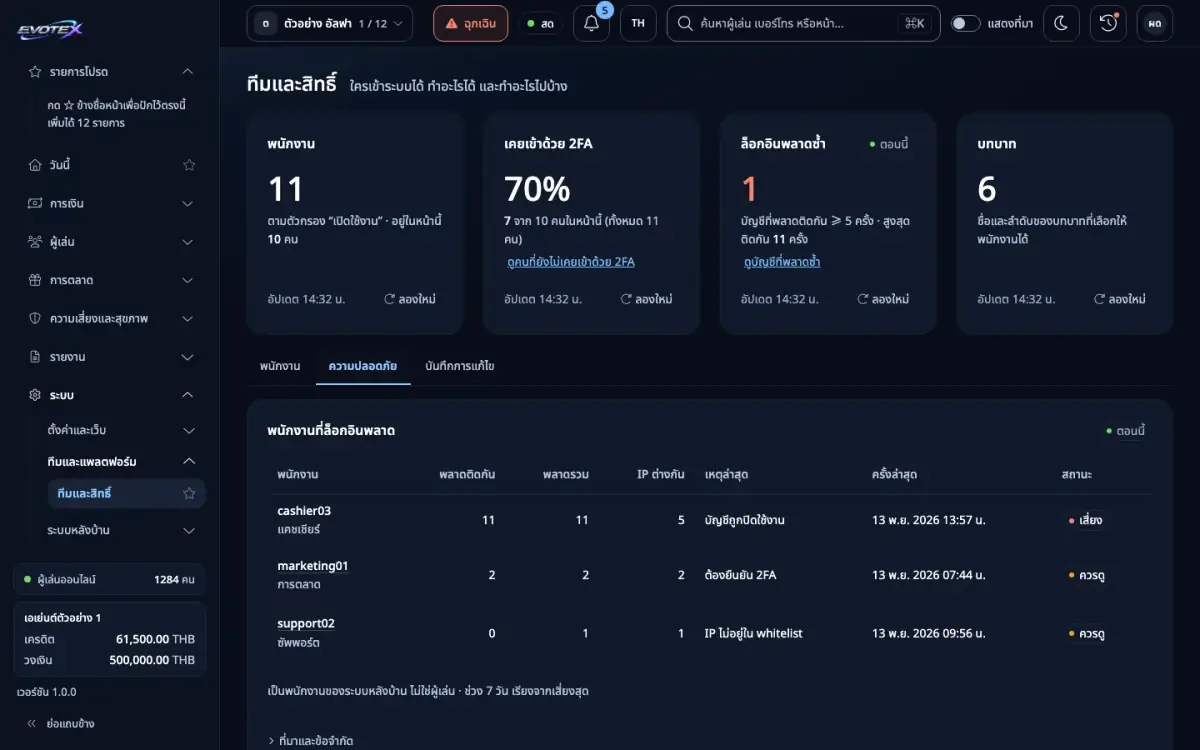
In EVOTEX: the Team and permissions page has 10 default roles. The permission system covers 41 menus at the level of a brand, a group, and the platform, and each menu can be set across 7 actions: see the menu, create, edit, delete, approve, export, and view the full number. You create a new role by copying an existing one, and choose the scope as one brand, some brands, all brands in a group, or the whole platform (can be tried in the demo). The same page has a warning box that tells you to turn on two-step verification fully before you give permission to approve withdrawals, but each person's two-step status in the demo is a sample. The details are in team and permissions
Ask the vendor: does the side menu change with each person's role, or are only the buttons hidden?
Point 11: look back and see who did what and when
What you get: you find the start of the story quickly when an item looks unusual.
In EVOTEX: the history and security page has 4 tabs: who did what, sign-ins, allowed IPs, and the emergency button. You can search and filter the action history, export CSV, and set it so the back office can be entered only from the team's IPs (can be tried in the demo. The button to unlock accounts with repeated wrong passwords is designed, not in the demo).
Ask the vendor: how long is the history kept, and is it easy to pull out to review?
Point 12: control the brand's player site from the back office
What you get: you can change what players see yourself, without sending a request to anyone.
In EVOTEX: the Player site menu turns individual game providers on or off, adds providers for the brand, changes the desktop and mobile banners, the light and dark mode logos, and the site icon (can be tried in the demo). The color editor has a preview with 12 color sets, plus the font and the font size. These are designed, not in the demo. The demo lets you try them and look, but saving colors to the real brand is done at setup. Read more in the brand's player site (page in Thai)
Ask the vendor: when does a color change show on the real player site, and how many times can you change it yourself?
Three things that aren't menus, but make a team want to use it every day
These things aren't in the list of menus, but they decide whether the team finds the back office smooth to use.
- Works on mobile: every page is designed to work at 390 px wide, tables become cards, and the details open from the bottom of the screen. It has been checked in a browser, and real iOS and Android devices haven't been tested yet
- Fast search: press / or ⌘K and type to search right away. The search box changes meaning depending on the page that's open
- Clear status: every page has states for empty, loading, error, and offline. Numbers are hidden instead of showing old values, so the team doesn't read old numbers without knowing
The 12-point summary table, ready to ask every vendor
| Point | Role | What you need | In EVOTEX |
|---|---|---|---|
| 1 | Owner | One page that shows money in, money out, and pending work | Can be tried in the demo |
| 2 | Owner | Several brands in one table | Can be tried in the demo. Cross-brand numbers are estimates |
| 3 | Owner | Reports with a date range and export | Sample |
| 4 | Finance | A withdrawal queue with continuous approval | Can be tried in the demo |
| 5 | Finance | A deposit list that separates automatic from manual top-up | Can be tried in the demo |
| 6 | Finance | Manage payment accounts and the rotation plan | Can be tried in the demo |
| 7 | Support | Player search and profile | Can be tried in the demo. Risk is a sample |
| 8 | Support | Chat and auto-reply rules | Can be tried in the demo. Testing the AI is simulated |
| 9 | Marketing | Promotions and messages | Can be tried in the demo. Recipient groups are a sample |
| 10 | Team admin | Fine-grained permissions by role | Can be tried in the demo |
| 11 | Team admin | A history of who did what | Can be tried in the demo. The account unlock button is designed, not in the demo |
| 12 | Team admin | Control the player site from the back office | Providers, banners, and logos can be tried. Colors and fonts are designed, not in the demo |
The way to make this table work is to request a demo and have each role really try their own points. The owner tries points 1 to 3, finance tries points 4 to 6, and support and marketing try points 7 to 9. If any point needs the technical team to come and set it up, write it down, because that is time your team will lose every day. You can try the EVOTEX demo at try the back office with sample data
What to ask our team
This page can't confirm these things, so ask our team during your demo call.
- Which deposit channels the system can pick up by itself in your brand, because this depends on each brand's connections
- When the numbers on the Today page and in the reports connect to the brand's real data, because the demo uses sample data throughout
- How saving the player site colors and fonts to the real brand is done at setup
- When real-time alerts for overdue withdrawals are really available. In the demo they are simulated
- What tools there are to help move data from your old system, because the demo can't import player data
- The back office is in Thai only. If your team needs another language, ask first
Keep reading
- How to choose a betting site back office: 8 points: use it to compare several systems once this checklist is done
- How the withdrawal queue works: the work the finance team does every shift, screen by screen
- Reports a brand owner should open every day (page in Thai): follows on from points 1 to 3
- How automatic deposits and withdrawals work: follows on from points 4 to 6
- Money in and out: feature by feature, with images from the demo
Our team's target is to open a new brand within 14 to 21 working days after the scope is agreed. See what the package includes on the packages and pricing page (page in Thai)
Related features
- Turn a promotion on or off with the switch in its row sample in the demo
- Search players by name, number, or by pressing / sample in the demo
- The Today page: the net and all pending work sample in the demo
Related reading
How to choose a back-office system
Questions to ask a vendor
How the withdrawal queue works
The finance team's order of work

Request a demo
Want our team to look at the real thing with you? Request a demo.