
What changed in the demo: a log by real date you can check yourself
See what has changed in the EVOTEX back office demo, in order of real date. Each item has a link so you can try it yourself, and says which parts are still sample data.
Latest demo version: 18 November 2026
The latest demo version has 27 pages, uses sample data throughout, and needs no sign-up. You can try it yourself on the back office demo Today page (opens in a new tab), or read how to try it at try the back office with sample data
This page records what changed in the demo, by real date. The date is the date we published that demo version on this site, not the date the back office was built. So the list has only what has really changed.
What changed: newest on top
Each entry has the same three lines: what changed, where to try it, and which part is still sample data.
- sample in the demo
the player site color editor with easy settings
- What changed
- the colors tab has an easy settings box at the top. You can choose five colors: the main color, the secondary color, the accent color, the site background, and the card background. The system works out the other colors. If a color pair is hard to read, it warns you and gives a button to use the suggested color. You can choose from 6 Thai fonts, and set the font size from 13 to 18
- Where to try it
- the player site color editor in the demo (opens in a new tab). Open the Themes and colors tab of the Player site page, then choose the Colors tab
- Still a sample
- you can choose colors and see the result, but it isn't saved to the real player site. Saving is done at setup
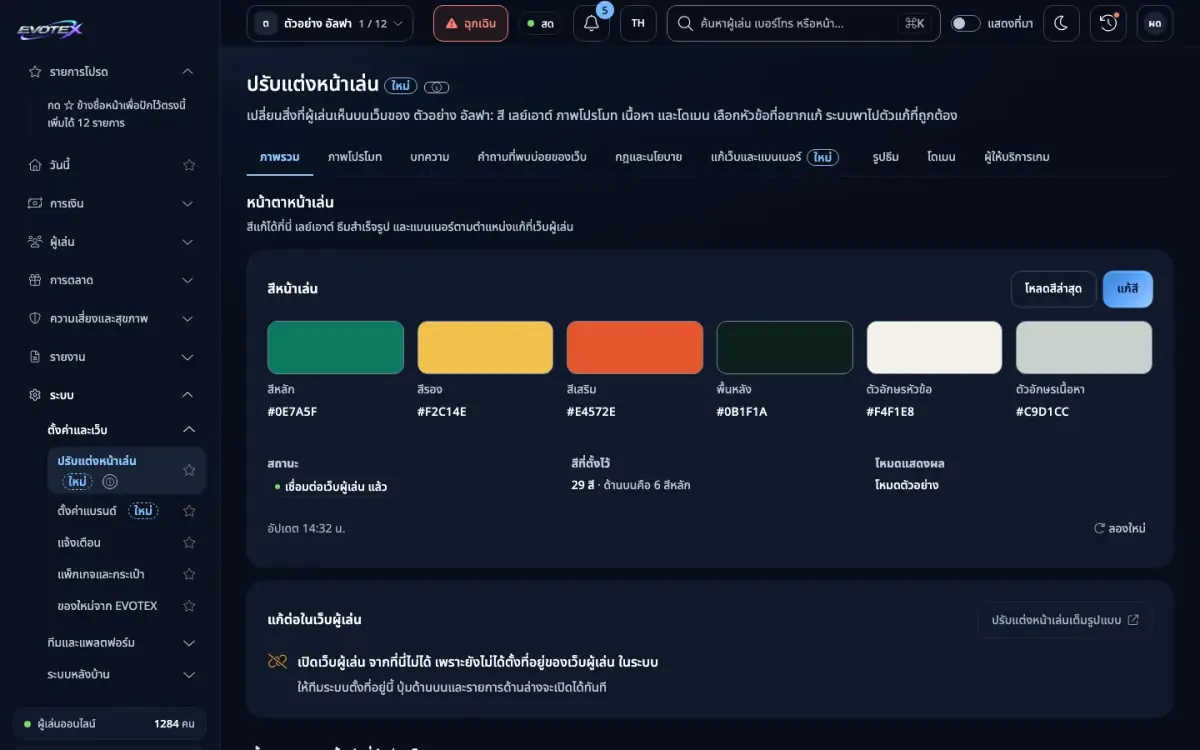
Image: the easy settings box in the colors tab of the demo, to choose the main color, the secondary color, the accent color, the site background, and the card background (sample data from the EVOTEX demo) - sample in the demo
the four color previews of the back office now load the real page
- What changed
- the back office color picker page has four live previews: the Today page and the withdrawal queue page, each in a light and a dark version. In the earlier version these previews showed an error message when opened from this site. This version fixes that
- Where to try it
- the back office color picker page in the demo (opens in a new tab)
- Still a sample
- the colors you choose affect only the back office on that device. They are kept in the browser, and they aren't the player site's colors
- sample in the demo
the names and addresses shown as sample in the demo all use the EVOTEX name
- What changed
- the product names and sample web addresses seen on the LINE settings page and the Player site page now read as EVOTEX throughout the demo
- Where to try it
- the Player site menu in the demo (opens in a new tab)
- Still a sample
- these addresses are samples, not live sites
- sample in the demo
the mobile demo video was recorded again
- What changed
- the demo video on a phone is about 1 minute 19 seconds long, with no sound, and has Thai captions
- Where to try it
- the video on the try the back office with sample data page
- Still a sample
- the names, amounts, and accounts in the video are all sample data
- sample in the demo
screenshots from the demo grew to 84
- What changed
- we added screenshots from the demo to look at before you try it yourself. They are used on the feature pages and in the guides, and come from the same demo you can try
- Where to try it
- all the back office features
- Still a sample
- every image is labeled sample data, and the numbers in the images have nothing to do with any brand's account or money
- sample in the demo
the first back office demo went up on this site
- What changed
- the first back office demo opened on this site, with 27 pages. You can try approving or rejecting items, searching players, and switching to mobile yourself, with no sign-up
- Where to try it
- the back office demo Today page (opens in a new tab)
- Still a sample
- all the data was made up so you can press things. When you reload the page, the data goes back to how it was
What the demo doesn't do yet
The list above covers only what was added or fixed. What the demo is still a draft or simulated in is as follows:
- Real-time alerts for overdue withdrawals are simulated
- Saving colors to the real player site is done at setup
- Reports export only as CSV files
- The demo screens are in Thai only
For the full list of what can't be tried completely, read try the back office with sample data. For the screens of each feature, and which items are not in the demo yet, see all the back office features
How to check it yourself
You can check the list above yourself in a few minutes. Open the link on the Where to try it line, then compare it with the What changed line. If anything doesn't match, treat this page as wrong.
For other things about EVOTEX that you can check yourself, read about us
Keep reading
Keep reading by what interests you:
- For the overview of launching a turnkey betting website, see the full checklist
- To set up the colors and look of the player site, read white label
- For pricing and the package, see our packages (page in Thai)
Related reading
Try the demo
Press approve and reject, and switch to mobile, in the demo back office yourself, with no account
About us
The engineers who build both the back office and the player site, and how we work

Request a demo
Try the demo yourself right away, with no sign-up, and compare it with the items on this page