
Open a brand in 14 to 21 working days: a week-by-week plan for operators
People planning a turnkey betting website often ask first how long it takes. The short answer is our team's target: 14 to 21 working days after the scope is agreed. This article breaks that target into a week-by-week plan, so you see who does what in each phase.
Contents
All the numbers are targets, not promises. The real time depends on how fast you send everything complete, and how big the brand's scope is.
Not for: people looking for a fixed guaranteed launch date, and individual players, because this article is a target plan for operators.
Before the clock starts: what has to be done before the scope is agreed
The clock of 14 to 21 working days starts counting after the scope is agreed. It doesn't start on the day of the first conversation. The time before that is your work, and it should end in a single page.
The scope to write down clearly:
- The number of brands you will open at the start, and the ones you will add later
- The market you will open, the language, and the currency
- The game providers you need
- Whether you use another system now, and whether you need to move data
- The people on your team who will use the back office, split by role
The laws of that market are something to talk through with your own legal adviser. EVOTEX provides the back office with the player site, and doesn't give legal advice. The detailed list of things to prepare is in the launch checklist: 10 points
You can talk price right now. If you want to see numbers first, read worked examples of launch costs (page in Thai)
How 14 to 21 working days are counted
EVOTEX has two clocks, and they are often confused.
- The first: open a new brand within 14 to 21 working days, counted from the day the scope is agreed
- The second: adapt the player site to your brand within 7 working days, counted from the day you choose a template
The second sits inside the first. If you choose a template quickly, the player site work finishes quickly. If you choose slowly, the second clock slips with it.
Working days don't include Saturdays, Sundays, and holidays. 14 working days is about three weeks on the calendar, and 21 working days is about four weeks.
The plan below splits into three weeks of real work, then a buffer of days 16 to 21. If testing passes in full before the end of week 3, you can open around days 14 to 15. Our team's targets are only two: 14 to 21 working days, and 7 working days after you choose a template. The split into weeks below is an example of how we lay out the work. It isn't a process that our team certifies, and it isn't a schedule agreed in a document.
Week 1: agree the scope, choose a template, and send what we need
Working days 1 to 5 are the week where you have to make many decisions. Our team's main work is to take the scope as the starting point.
You do:
- Confirm the scope with our team in writing
- Choose the player site template. You can see the options at player site templates
- Send the brand name, logo, main colors, and the banners you want to use
- Send the list of people on your team with their roles, for example owner, finance, support, marketing
Our team does:
- Set up the admin accounts and team permissions to match the list
- Prepare the brand's back office frame so it is ready to use
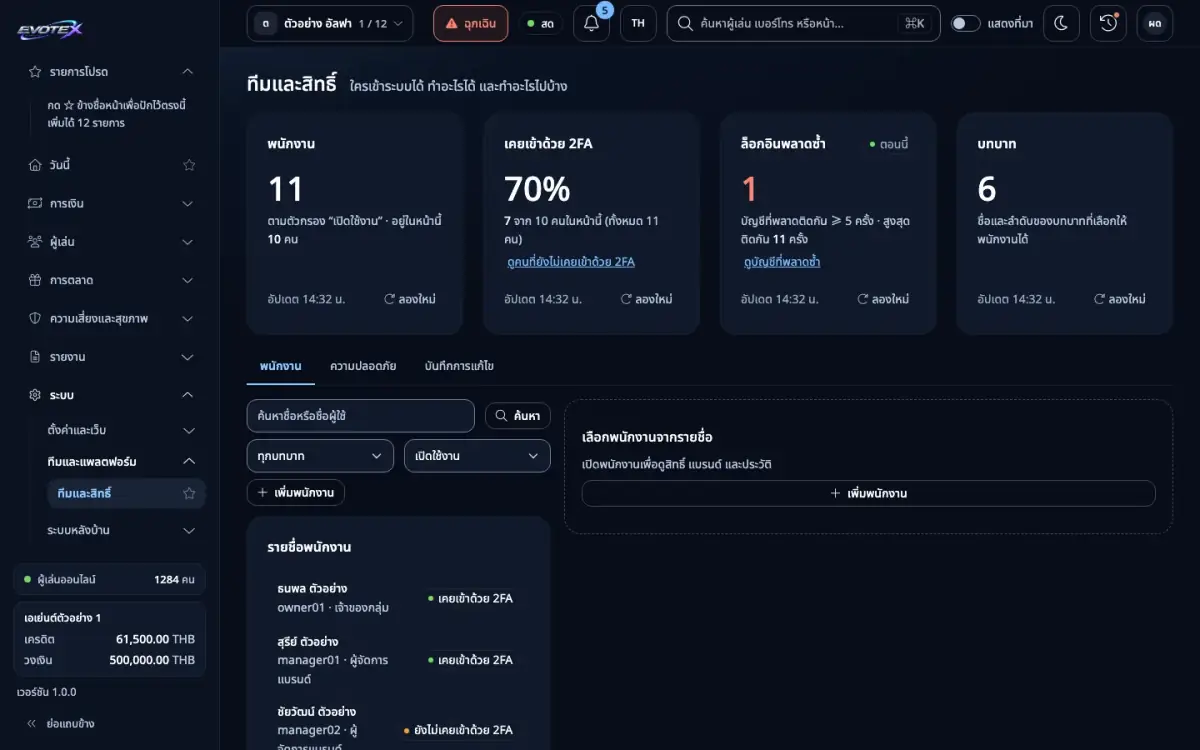
On team accounts: in the back office demo, the system creates an account with a password and tells the person. There is no invitation by email. It is faster if you have each person's name and phone number ready. Permissions can be set in fine detail per menu and per action. See the example of the Team and permissions page below.
By the end of week 1 you should have: the scope agreed, the template chosen, and the team list sent in full. Read more about splitting roles in team and permissions
Week 2: brand the player site, and connect game providers
Working days 6 to 10 are when the player site starts to become your brand's. The target is to adapt the player site to your brand within 7 working days after you choose a template. If you choose by working day 3, this work finishes before the end of week 2. If you choose on day 4 or 5, this work runs into the start of week 3.
Our team does:
- Adapt the player site to the brand name, logo, and colors you sent
- Turn on the game providers you agreed on, in the brand's back office
You do:
- Look at the player site preview and answer with what to fix
- Prepare your answer on the brand's payment channels, because this part depends on what the brand sets up itself
The Player site page in the back office turns individual game providers on or off, adds providers for the brand, changes the desktop and mobile banners, and changes the logo (can be tried in the demo). The color editor with a preview of 12 color sets can be tried in the demo. Saving the colors to a real brand is still designed, not in the demo, so ask our team how it's done at setup.
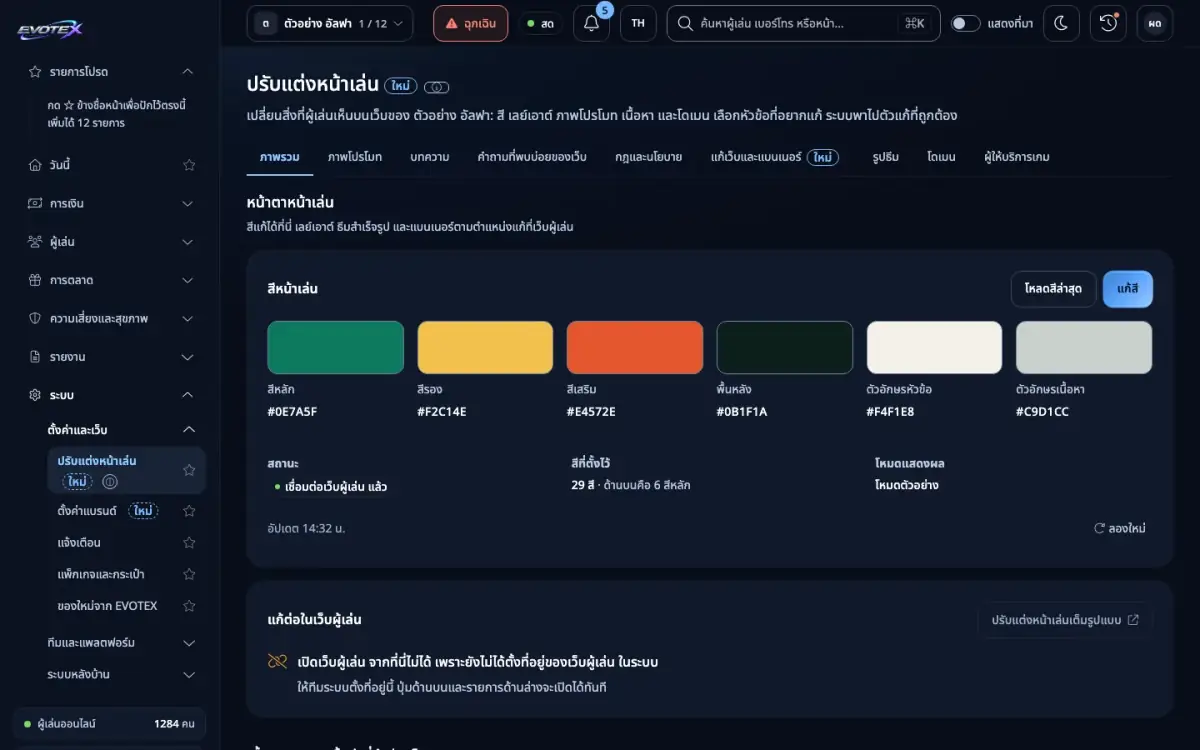
By the end of week 2 you should have: a player site that is now your brand's (if you chose the template by working day 3), the game providers opened as agreed, and your answer on the payment channels. If you want to see what there is to adjust on the player site, read the brand's player site (page in Thai)
Week 3: test the whole system together
Working days 11 to 15 are when your team tries the real back office together with our team. This step is what keeps you from running into problems on launch day.
Have each role try its own work, and write down the result of every point:
- Owner: open the Today page and see whether the numbers match what you expect
- Finance: try approving one withdrawal and rejecting one, and try one manual top-up
- Support: search for players, answer chats, and try a few auto-reply rules
- Marketing: set up one promotion, then turn it on and off
- Team admin: open the history page and check that what you just pressed was all recorded
- Everyone: open the back office on a phone at 390 px wide and try your own main work
Every page of the back office is designed to work at 390 px. It has been checked in a browser, and real iOS and Android devices haven't been tested yet. In the testing with our team, use your own team's phones too.
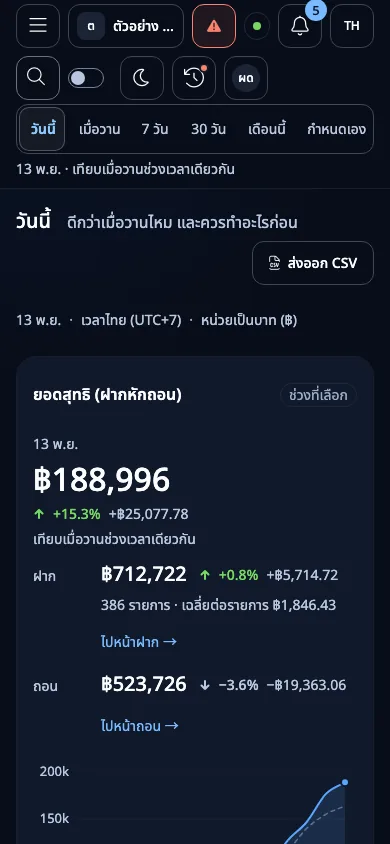
By the end of week 3 you should have: a test list that passes for every role, and a clear list of what still needs fixing. For how to read the withdrawal queue step by step, see how the withdrawal queue works
Days 16 to 21: the buffer and launch day
This period is the buffer of the 21-working-day target. Use it to fix what you found in week 3 and to prepare for launch day. If nothing needs fixing, you may open sooner than this.
What to do before you press open:
- Agree who watches the withdrawal queue on each shift
- Set the rule for how long an item can wait before it counts as overdue. In the demo you can set it and it is kept in the browser. The alert for overdue withdrawals is a simulated sample, and sending by real role is set at setup
- Agree who answers the phone when money is stuck
- Prepare the messages that support uses often to answer players
On launch day and in the first week after, open the Today page every morning and look at deposits, withdrawals, new members, and pending withdrawals.
The whole plan in one table, and what makes it slip
| Phase | Working days | Our team does | You do | By the end of the phase you should have |
|---|---|---|---|---|
| Before starting | Not counted yet | Answer questions about the scope | Write the scope, check the laws | A one-page scope |
| Week 1 | 1 to 5 | Set up admin accounts and team permissions | Choose a template, send the logo and the team list | Everything to send is complete |
| Week 2 | 6 to 10 | Adapt the player site, turn on game providers | Check the player site preview, answer about the money channels | The player site is branded, if you chose the template by day 3 |
| Week 3 | 11 to 15 | Test with your team, fix what is found | Try each role's work | The test list passes |
| Buffer | 16 to 21 | Fix what remains, prepare launch day | Agree on shifts and who watches the queue | Ready to open |
What often makes the plan slip. This part is general advice, not a statement of fact about EVOTEX.
- Sending the logo and text late, or fixing many rounds
- Choosing a template late, because the 7-working-day clock starts after you choose
- The answer on the laws of the market isn't ready
- The brand's payment channels aren't ready
- Asking for extra player site customization midway, which is a separate add-on
What to ask our team
This page can't confirm these things, so ask when you agree the scope.
- In practice, which day does the clock of 14 to 21 working days start counting, for example after the scope is signed or after the agreement is signed?
- If you send things later than agreed, does the clock stop or keep running?
- When in the plan is the brand's payment channel connection done, and what do you need to provide?
- How long does it take to open a game provider you ask for later?
- Is there team training before launch day, and how many hours?
- How does our team stay on hand to watch the system on launch day and in the first week?
- If you move the launch date after work has started, how much notice is needed?
Keep reading
- Launch checklist: 10 points: the preparation list to use alongside this plan
- Worked examples of launch costs (page in Thai): the total budget for one brand, and how to request a price if you have several brands
- What a back office must have: the 12-point checklist to use in the week 3 test
- Try the back office with sample data: try each role's work before the meeting to agree the scope
- Migrating your old back office: if you already use another system
Our team's target is to open a new brand within 14 to 21 working days after the scope is agreed. See what the package includes on the packages and pricing page (page in Thai)
Related features
- See today's numbers on a phone sample in the demo
- Add people to the team and give them roles sample in the demo
Related reading
Launch checklist
What to prepare before launch day
What a back office must have
A good back office gives the owner the whole picture on one page and lets the finance team close money work fast.

Request a demo
Want our team to look at the real thing with you? Request a demo.